Original: $204.27
-65%$204.27
$71.49The Story
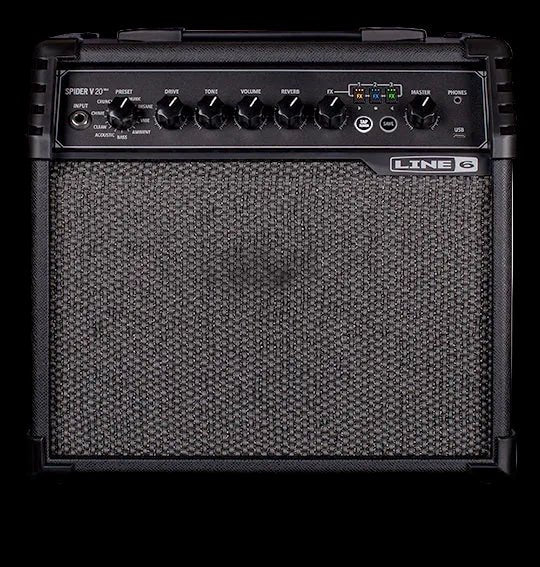
Spider V 20 MkII is the perfect practice amp for any guitarist, whether playing through one of the 16 tonally diverse presets, or dialing in personalized tones with the easy-to-use controls. Each preset contains effects that can be switched in and out stompbox-style using the dedicated FX buttons on the front panel, and there's also an independent Reverb knob.
Presets
Traditional amplifier, Artist, and Song presets deliver both classic and modern sounds. Optimized amp and effect default settings make it easy to craft your own tones.
Practice Tools
An onboard tuner and tap tempo control make practicing fun.
Free App & USB
Spider V 20 MkII features a USB port and an onboard audio interface for connecting to the free Spider V Remote editor/librarian app for Mac®, PC, iOS®, and Android™ devices, and recording using software such as Cubase® LE (included free). USB also enables you to share presets with the Spider V community on customtone.com.
PRESET Encoder
Turn to select one of the 16 available presets. A preset stores the value of each knob, as well as the FX 1, 2 & 3 model types and their bypass states.
Drive Knob
Controls how much gain you get in your sound.
Tone Knob
Controls the overall tone from dark to bright.
Volume Knob
Controls the preset volume independently of the Master Volume control.
Description
Spider V 20 MkII is the perfect practice amp for any guitarist, whether playing through one of the 16 tonally diverse presets, or dialing in personalized tones with the easy-to-use controls. Each preset contains effects that can be switched in and out stompbox-style using the dedicated FX buttons on the front panel, and there's also an independent Reverb knob.
Presets
Traditional amplifier, Artist, and Song presets deliver both classic and modern sounds. Optimized amp and effect default settings make it easy to craft your own tones.
Practice Tools
An onboard tuner and tap tempo control make practicing fun.
Free App & USB
Spider V 20 MkII features a USB port and an onboard audio interface for connecting to the free Spider V Remote editor/librarian app for Mac®, PC, iOS®, and Android™ devices, and recording using software such as Cubase® LE (included free). USB also enables you to share presets with the Spider V community on customtone.com.
PRESET Encoder
Turn to select one of the 16 available presets. A preset stores the value of each knob, as well as the FX 1, 2 & 3 model types and their bypass states.
Drive Knob
Controls how much gain you get in your sound.
Tone Knob
Controls the overall tone from dark to bright.
Volume Knob
Controls the preset volume independently of the Master Volume control.